
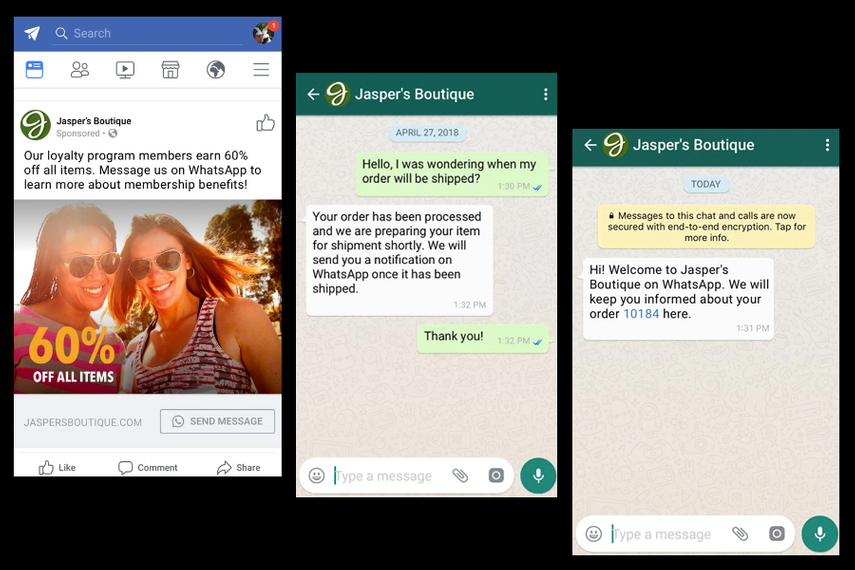
In today’s digital age, businesses are constantly seeking innovative ways to connect with their customers. One of the most effective strategies is integrating Facebook Ads with WhatsApp. This powerful combination allows brands to reach their audience where they spend time, engage in meaningful conversations, and drive conversions. With over 2 billion users on WhatsApp, this integration offers a unique opportunity to enhance customer interactions and boost sales.
The Power of Facebook Ads and WhatsApp
Facebook Ads have long been a staple in digital marketing, offering businesses the ability to target specific audiences with precision. When combined with WhatsApp, a platform known for its high engagement rates, the result is a potent marketing tool. By leveraging the strengths of both platforms, businesses can create a seamless customer journey that starts with an ad and ends with a sale.
Why Integrate Facebook Ads with WhatsApp?
-
Increased Engagement: WhatsApp is a preferred communication channel for many users. By directing them from Facebook Ads to a WhatsApp chat, businesses can foster more personal and immediate interactions.
-
Higher Conversion Rates: The ease of messaging directly through WhatsApp can lead to quicker decisions and higher conversion rates. Customers appreciate the convenience of chatting without the need for lengthy forms or emails.
-
Enhanced Customer Experience: Personalized messages and quick responses can significantly improve the customer experience, leading to increased satisfaction and loyalty.
-
Data Collection: WhatsApp provides valuable insights into customer behavior, allowing businesses to gather data that can be used to refine their marketing strategies.
Steps to Integrate Facebook Ads with WhatsApp

Integrating Facebook Ads with WhatsApp involves several key steps. Here’s a comprehensive guide to help you get started:
1. Set Up Your WhatsApp Business Account
Before you can start creating ads, you need a WhatsApp Business account. This can be done through the WhatsApp Business App or via the Meta Business Suite. Ensure your business has a dedicated phone number and a verified profile to establish credibility.
2. Create a Facebook Page
A Facebook Page is essential for promoting your business. It serves as a hub for your brand, where you can post updates, share content, and run advertisements. Make sure your page is optimized with relevant information, including your business hours, contact details, and a compelling “About” section.
3. Link Your WhatsApp Business Account to Facebook
To enable the integration, link your WhatsApp Business account to your Facebook Page. This connection allows you to create ads that direct users to a WhatsApp chat. Follow the instructions provided by Meta to ensure a smooth setup process.
4. Create Your Facebook Ad Campaign
Using Facebook Ads Manager, create a campaign that targets your desired audience. Choose the appropriate objective, such as “Engagement,” “Traffic,” or “Sales.” Customize your ad content to include a “Send Message” button that opens a WhatsApp chat.
5. Design Your Ad Content
Craft compelling ad copy that encourages users to click and engage. Use eye-catching visuals and clear calls to action. For example, you could use phrases like “Message us for deals!” to entice potential customers.
6. Monitor and Optimize Your Campaign
Once your ad is live, monitor its performance using Facebook Insights. Track metrics such as clicks, impressions, and conversions. Use this data to refine your strategy and optimize your campaigns for better results.
Best Practices for Effective Integration
To maximize the effectiveness of your Facebook Ads and WhatsApp integration, consider the following best practices:
1. Personalize Your Messages
Tailor your messages to the individual needs of your customers. Use the data collected from your WhatsApp interactions to create personalized experiences that resonate with your audience.
2. Utilize Automation Tools
Implement chatbots to handle common inquiries and provide instant support. Automation can streamline your customer service processes and free up your team to focus on more complex tasks.
3. Maintain a Consistent Brand Voice
Ensure that your messaging aligns with your brand’s voice and values. Consistency helps build trust and reinforces your brand identity.
4. Engage with Your Audience
Regularly interact with your customers through WhatsApp. Respond to messages promptly and engage in meaningful conversations to build relationships and foster loyalty.
5. Analyze Your Data
Use analytics tools to track the performance of your campaigns. Gain insights into what works and what doesn’t, and make data-driven decisions to improve your marketing efforts.
Real-World Examples
Several businesses have successfully integrated Facebook Ads with WhatsApp to achieve impressive results. For instance, EcoWorld, a real estate company, utilized “Message Us” buttons on social ads, generating 15,000 WhatsApp conversations and achieving a 6.5x ROI on their ad spend. Similarly, Maggi improved customer satisfaction by implementing a 24/7 WhatsApp helper, demonstrating the power of this integration.
Conclusion
Integrating Facebook Ads with WhatsApp is a strategic move that can significantly enhance your marketing efforts. By leveraging the strengths of both platforms, businesses can create a seamless customer journey that drives engagement, increases conversions, and fosters loyalty. With the right approach and continuous optimization, this integration can become a cornerstone of your digital marketing strategy.
About the Author




