
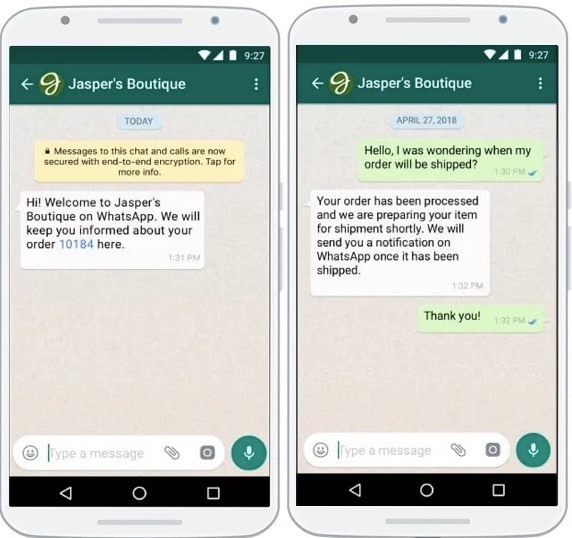
In today’s fast-paced digital world, businesses are constantly looking for ways to streamline customer interactions and improve response times. One of the most effective tools in this regard is the use of custom WhatsApp auto-reply messages. These automated responses not only save time but also enhance the overall customer experience by ensuring that every message receives a prompt and professional reply.
WhatsApp, with over 2 billion active users globally, has become an essential platform for businesses to connect with their customers. The ability to set up custom auto-replies allows companies to maintain a consistent and efficient communication strategy, even when they’re not available to respond manually.
What Are Custom WhatsApp Auto-Reply Messages?
Custom WhatsApp auto-reply messages are pre-written responses that are automatically sent to incoming messages. These messages can be tailored to suit different scenarios, such as business hours, out-of-office periods, or specific customer inquiries. They help businesses manage their communications more effectively, especially during high-volume periods or when staff is unavailable.
For example, a business might set up an auto-reply that says, “Thank you for your message. We will get back to you within 24 hours.” This ensures that customers know their inquiry has been received and that a response is on its way.
Benefits of Using Custom WhatsApp Auto-Replies
-
Enhanced Customer Service: Auto-replies provide instant acknowledgment of customer inquiries, setting clear expectations about response times. This helps in managing customer expectations and reducing frustration.
-
Time Savings: Automating responses to frequently asked questions or standard inquiries saves valuable time, allowing staff to focus on more complex tasks.
-
Consistent Communication: Auto-replies ensure that all messages are handled in a uniform and professional manner, regardless of the volume of incoming messages.
-
Improved Efficiency: By automating routine tasks, businesses can operate more efficiently, leading to better productivity and customer satisfaction.
-
Professional Image: A well-crafted auto-reply can reinforce a business’s brand image, making it appear more organized and reliable.
How to Set Up Custom WhatsApp Auto-Replies
Setting up custom WhatsApp auto-replies is a straightforward process. Here are the steps to follow:
-
Enable Away Messages: Open the WhatsApp Business app and navigate to Settings > Business Settings > Away Message. Toggle the switch to activate the feature.
-
Personalize Your Message: Tap on the message field to input your custom away message. You can type your own message or choose from examples provided in the app.
-
Schedule Your Away Message: Choose when you want the message to be sent. Options include “Always send,” “Custom schedule,” and “After business hours.”
-
Select Recipients: Decide who should receive your away message. Options include “Everyone,” “Everyone not in the address book,” “Everyone except,” and “Only send to.”
Best Practices for Crafting Effective Auto-Replies
To make the most of your custom WhatsApp auto-replies, consider the following best practices:
- Keep It Concise: Auto-replies should be short and to the point, providing necessary information without overwhelming the user.
- Use Personalization: Address the recipient by name or include a friendly greeting to make the message feel more personal.
- Focus on Clarity: Ensure your messages are easy to understand and free from jargon or complex language.
- Maintain a Professional Tone: Avoid slang or abbreviations that may confuse or alienate users.
- Be Transparent About Response Times: Let users know if they can expect a reply during working hours or if there might be a delay.
Examples of Custom WhatsApp Auto-Replies
Here are some examples of effective custom WhatsApp auto-reply messages for various scenarios:
- Business Hours: “Hi! Thank you for contacting us. We’re happy to help you during our business hours from Monday to Friday, 9 am to 5 pm. Expect a prompt reply!”
- Vacation: “Hey there! Thanks for messaging. I’m soaking up the sun on a tropical island, but I’ll get back to you soon after I recharge my batteries. Thanks for your patience!”
- Event Details: “Hello! Thanks for reaching out. Our upcoming event is going to be a blast! Get all the juicy details here [insert a link to the event page]. Can’t wait to see you there!”
- Personal Task: “Hey! Thanks for your message. I’m in the middle of a task right now but I will reply to you as soon as I can. In the meantime, here’s a funny cat video [insert a link to video] to brighten your day!”
- Out of Office: “Hi! Thank you for messaging. I’m currently out of the office on a top-secret mission. For any urgent matters, please contact [insert emergency contact details].”
By implementing these strategies, businesses can create a seamless and efficient communication experience for their customers. Custom WhatsApp auto-replies not only enhance customer service but also contribute to a more professional and organized brand image.
About the Author




